Assigning Tasks to a Third-Party Contact
If the Third-Party Accounts module has been enabled in Policy & Procedure Management, you can assign third-party contacts as writers, reviewers, and assignees when you create content.
Important: Before you can assign third-party contacts to content, the item must be assigned a template with Third-Party Accounts enabled. Your administrator can tell you which templates have Third-Party Accounts enabled.
Assign Tasks to a Third-Party Contact
- Create a new document or open a draft document or assessment.
- In the Properties Wizard, select the Writers, Reviewers, or Assignees step.
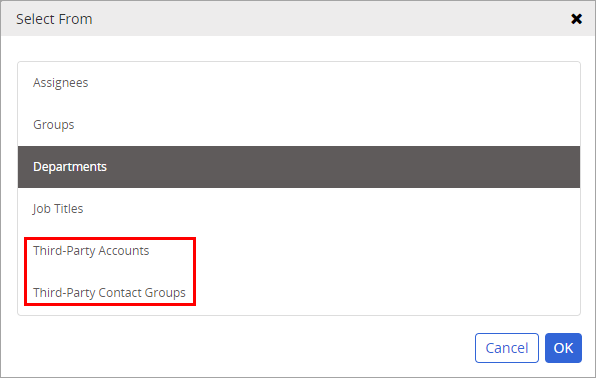
- For Select From, select Third-Party Accounts or Third-Party Contact Groups, and then click OK.
- If you have access to multiple sites, use Site to select the site or sites to which one or more third-party accounts or groups are assigned.
- Do any of the following:
- If you selected Third-Party Contact Groups for Select From, select one or more groups.
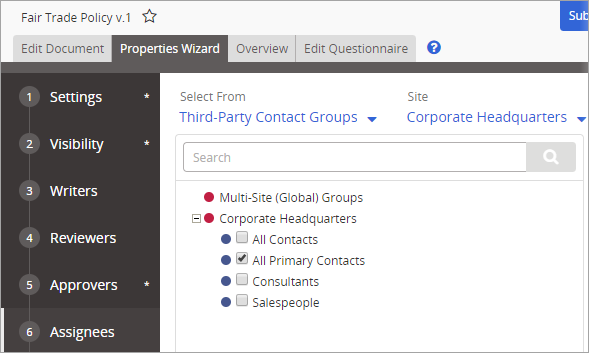
- If you selected Third-Party Accounts for Select From, click an account, select one or more contacts, and then click OK.

Note: The names of those designated as primary contacts are marked with an asterisk (*).
- If you selected Third-Party Contact Groups for Select From, select one or more groups.
-
Click Save.
 Product Information
Copyright
Product Information
Copyright
This publication was written and produced at NAVEX Global, Inc., Lake Oswego, Oregon. This publication or any portion thereof is confidential and/or proprietary and may not be reproduced or used in any manner whatsoever without the express written permission of NAVEX Global, Inc.
Copyright © 2026 NAVEX Global, Inc. NAVEX Global® is a registered trademark/service mark of NAVEX Global, Inc. The NAVEX Global® logo is a trademark/service mark of NAVEX Global, Inc. Unauthorized use of NAVEX Global, Inc.’s trademarks/service marks is strictly prohibited without prior written permission from NAVEX Global, Inc.